
Module, UDP or TF card: how integration depth, field service and the physical envelope decide the choice, with the three formats compared on one page.
The short answer
Three flash formats go into other people’s products, and the choice is decided on three dimensions before price is discussed.
- Space inside the housing. No cavity, no connector. Under about 20 mm of length, the soldered UDP module is the only one of the three that fits.
- Mating cycles over the product’s life. A connector that gets cycled 5,000 times is a wear item. A soldered joint is not — it is a repair.
- Whether storage must leave the product. User-removable, field-serviceable, or sealed in. This one overrides the other two.
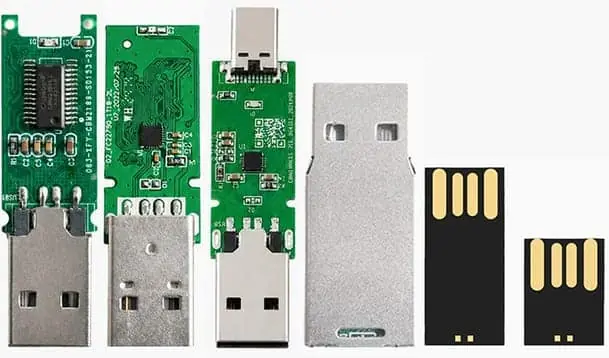
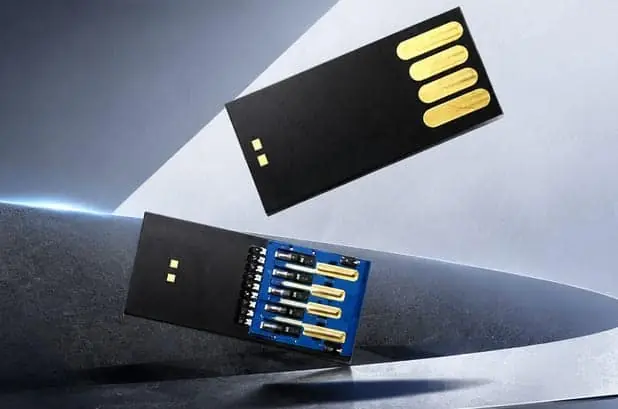
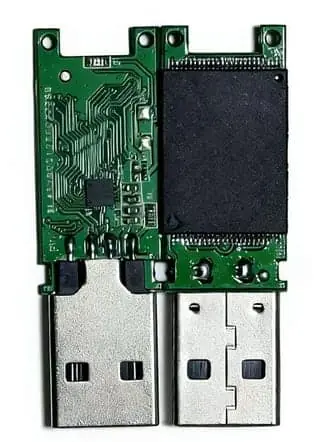
Naming note, because it trips people up in email: in this article module means the semi-finished PCBA at 12 × 48 mm, 3.2 g. UDP means USB Disk in Package — the epoxy-sealed part at 25 × 11.3 × 1.4 mm, 0.819 g. Both get called “module” by somebody, which is why dimensions matter more than the word.
The three dimensions, and what each one decides
| Measurement | What it decides | If the answer is small / low / no | If the answer is large / high / yes |
|---|---|---|---|
| Space on the PCB and inside the housing | Whether a connector can exist at all | UDP or module: no connector, no cut-out, no cable | Finished drive or card, with a connector and a housing |
| Mating cycles over product life | Whether the connector is a wear item | Module or UDP, soldered once | Card or drive, where the connector is designed to be cycled |
| Removability requirement | Whether storage must leave the product | Module or UDP, fixed internal storage | Card or drive, removable by the user or a field engineer |
Run them in that order, because they are not independent. A product that needs removability cannot use a soldered part however much room it has, and a sealed product with no service access should not use a connector it can never reach. Capacity and interface only pick within the format this leaves standing.
The matrix
| Semi-finished PCBA | UDP module | TF card | |
|---|---|---|---|
| Footprint | 12 × 48 × 4.5 mm | 25 × 11.3 × 1.4 mm | 15 × 11 × 1 mm |
| Weight | 3.2 g | 0.819 g | 0.25 g |
| Capacity | 128MB – 128GB | 4GB – 32GB | 4GB – 256GB |
| Interface | USB 2.0 / 3.0 | USB 2.0 | SD bus, SPI, UHS-I |
| How it attaches | Solder, or a board connector | Solder only | Socket |
| Housing | You supply it | You mould around it | None — the card is the product |
| Field replacement | No | No | Yes, by the user |
| Minimum order | 50 | 50 | 50 |
| Best at | Custom bodies, unusual outlines, USB 3.0 | Thin products, sealed assemblies, cost | Capacity, replacement, availability |
Read down the capacity row first. Above 32GB the UDP module is out. Above 128GB the PCBA is out. Above 256GB all three are out.
Why “which is faster” is the wrong first question
All three run USB 2.0 at up to 25 MB/s read in our standard configurations, and the TF card adds a bus that is faster than any of them when the host supports it. If speed is your deciding factor you are probably not buying a component — you are buying a product, and the comparison lives somewhere else.
The question that sorts these three is what happens when one fails in year three. A card in a socket is a support call and a replacement in the post. A soldered board is an RMA. A UDP module soldered into your PCB is an RMA plus a rework station, and in a potted assembly it may be a scrapped unit.
That single difference decides more designs than any speed figure. Brands selling to consumers with no service network choose cards. Brands that seal a product and never want to see it again choose UDP.
Where each one wins
Semi-finished PCBA wins when the body is yours. A drive with an unusual outline, a drive built into furniture, a promotional piece in a shape nobody stocks — the board is the part that has to fit, and the enclosure is where your design lives. It is also the only one of the three on USB 3.0, and the only one that goes down to 128MB.
UDP module wins when the product is thin and sealed. It is 0.819 g and 1.4 mm thick, it has no housing to buy, and it can be moulded into a card-sized object that looks like nothing inside. A wallet card, a badge, a keyfob with an epoxy fill — those are UDP shapes. The ceiling is 32GB, and that is the trade.
TF card wins on capacity, on service and on availability. It reaches 256GB, it is the only one a user can replace, and the only one you can buy in small quantities without a lead time. It also needs a socket, a retention feature, and a decision about whether the user can reach it.
The specification sheet, one for all three
Most quotes are not comparable because each supplier answers a different question. Use one sheet for all three options:
| Item | What to specify | Why it matters |
|---|---|---|
| Host interface | USB 2.0 / USB 3.x / SD bus, plus the host controller part number | Determines the driver path and the achievable throughput |
| Required sustained write | MB/s, measured over at least 10 minutes of the product’s real write pattern | Burst numbers mislead; sustained is what your product sees |
| Required sustained read | MB/s, same conditions | Boot time, playback, log retrieval |
| Workload pattern | Sequential vs small-block random; write-to-read ratio | Random small-block is the usual weak point |
| Capacity | Nominal and usable, with file-system overhead stated | Capacity claims and usable capacity differ |
| Operating temperature | The product’s internal ambient, not the room | Affects both NAND and controller behaviour |
| Lifetime write volume | Total GB written over product life | Sizes the endurance requirement |
| Removability | User-removable / serviceable / sealed | Picks the option |
| PCB budget | Area and height available | Rules options in or out |
| Firmware update path | Who provides it, how it is applied, what happens on failure | Long-term risk |
| Second source | Acceptable alternates, or explicitly single-source | Supply continuity |
Eleven rows, and the first three do most of the work. A supplier who answers all eleven has read your product; one who answers four has read your email.
Where to go next
The TF vs USB vs UDP page carries this comparison as a printable sheet. UDP vs COB vs PCB covers the packaging question underneath it, which is where most of the cost difference actually lives. For the capacity side — where each band stops making sense — see capacity bands. And if the format is settled and you want it quoted, what to send for a quotation is the shortest route.
Sources
- SD Association — SD Specifications & Speed Class / Application Performance Class
- USB Implementers Forum — USB 2.0 / USB 3.2 specifications and compliance
- JEDEC — JESD84 eMMC standard and related memory standards
- Linux kernel documentation — MMC/SD and USB mass storage subsystems
- Microsoft Learn — Windows USB device and storage driver documentation
- Apple Developer / Support — external storage and removable media behaviour
Frequently asked questions
Can I just solder a TF card socket and use the cheapest card I can find?
You can, but you are then buying a mechanical contact, a socket tolerance and a card vendor's firmware all at once. Card-to-card and lot-to-lot variation in real-world write behaviour is larger than most BOMs assume. If the product must survive vibration or repeated handling, a soldered module (UDP or USB module) removes the socket as a failure point. If the product needs user-replaceable storage, a TF socket is the right answer and the work moves to qualifying the card.
Is a USB flash module the same as a UDP module?
No. A UDP (USB Disk in Package) is a flash die plus a USB controller in a single molded package intended to be soldered to a PCB. A USB flash module is typically a small PCB assembly — controller, flash, passives and a USB interface — mounted on or into the product. Both present as USB mass storage to the host, but they differ in footprint, mechanical retention, rework and how much of the design you control.
Do UDP modules support the same speed classes as microSD cards?
Speed class (U1/U3/V30) and application performance class (A1/A2) are SD Association marks defined for SD/microSD products. They do not apply to USB-attached devices. For a UDP or USB module, ask for the controller and flash part numbers and the sustained read/write your test actually measured, not a card-style class badge.
What should I put in the RFQ to compare these three options fairly?
Interface and host (USB 2.0 or 3.2, or SD/MMC), required sustained write in the product's real workload, operating temperature, expected lifetime write volume, whether the storage must be user-removable, PCB area and height budget, rework/replacement plan, and firmware update path. Ask each supplier to quote against that same list so the numbers are comparable.
Does WINTEL publish speed classes, endurance or MOQ for these products?
No. WINTEL's confirmed public information covers its legal entity, address, contact details, team and factory scale, and its RoHS compliance and SGS test reports. Speed class, endurance/TBW, temperature range, MOQ and lead time are project-specific and must be confirmed in writing for your RFQ.