Yes — custom printing on the back of a microSD card is possible with UV or pad printing. Here is how it works, what the limitations are, and how to set up the artwork.
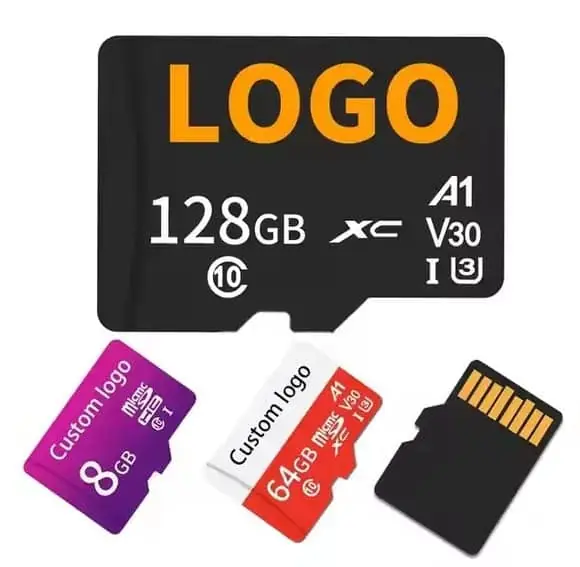
Yes, we can print a logo, text or serial number on the back of a microSD card using UV printing or pad printing. The printable area is roughly 11 × 14 mm — the whole back surface except the notch and the contact pins area on the front. UV print gives the best quality for full-colour artwork; pad print is used for 1–2 colour designs on orders where UV is not available. Minimum is 50 pieces per design, and printing adds 0.20 to 0.80 USD per unit depending on colour count and method. WINTEL supplies this from its own plant in Shenzhen, China.
The short answer: yes, we can print on the back of a microSD card — and it is more common than you might think.
A customer last month wanted their logo on the back of 2,000 cards for a medical device, until I showed them the back is where the gold contacts sit — covering them means the card will not read. We moved the logo to the front label area and kept the contacts bare. If your reason for back-print is “more space for branding,” the front usually has room; if it is “security marking,” there is a better place for that too.
“Can you print on the back of a microSD?” — yes, but the back is the tiny gold-contact side, and that is exactly the side you must not cover. Here is what actually works.
Branded microSD cards are popular for dashcam packages, phone accessories, camera kits and product bundles. The print area is small, but a clean logo stands out well.
Here is how it works, what the limits are, and how to set up artwork so it actually looks good when it arrives.
What you can print — and where
A standard microSD card is 11 × 15 mm. The printable area on the back is slightly smaller.
| Area | Dimensions | Notes |
|---|---|---|
| Total back surface | 11 × 15 mm | Full back of the card |
| Usable print area | ~10 × 13 mm | Leave 1 mm margin from all edges |
| Safe text area | ~8 × 11 mm | Inside that, for anything that must not get cut |
That is smaller than most people imagine. A 10 × 13 mm rectangle is about the size of a fingernail. Simple logos and short text work well. Complex artwork usually does not.
What prints well:
- Clean, simple logos with high contrast
- Short text (brand name, website URL, model number)
- 1–2 colour designs
- QR codes (version 3–5, about 10–12 mm)
What does not print well:
- Small text below 6 pt
- Fine detail or thin lines
- Gradients and photographs (possible with UV, but hard to see at that size)
- Multiple small elements that blur together
Printing methods for microSD cards
Two methods are commonly used on memory cards.
| Method | Cost per unit | Best for | Quality |
|---|---|---|---|
| UV print | 0.30–0.80 USD | Full-colour artwork, photos, complex logos | Very good — digital precision |
| Pad print | 0.25–0.60 USD | 1–2 solid colours, text, simple logos | Good — but registration limits |
UV print is our default for custom microSD orders, because it handles the small surface better than any other method. The print head can place ink precisely on the flat back surface, and the UV ink cures instantly.
Pad print is used for 1–2 colour designs on very high volume orders, or when the card has a slightly curved back surface that UV cannot reach evenly.
How we handle alignment
Because the card is so small, alignment matters more than on a USB drive body. Here is how we do it:
- You send the artwork sized at 100% scale, positioned where you want it on the card.
- We make a proof (digital mock-up) showing the logo on the card, to scale.
- You approve the position before we make the print setup.
- We run 5 first-article samples and check alignment before starting the full run.
If you need the logo perfectly centred, say so. If it needs to be above the capacity marking, say so. The more specific you are, the less chance of a surprise.
Artwork setup tips
Get the artwork right on the first try and you will skip two rounds of revisions.
Do this:
- Send vector artwork (AI, EPS, or PDF with outlines)
- Outline all text — do not leave fonts live
- Work at 100% scale (the actual card size)
- Use high-contrast colours — light logo on dark card, or dark on light
- Keep it simple. One logo, one line of text, maybe a QR code. That is it.
Do not do this:
- Send a 72 DPI JPG pulled from a website
- Put five lines of tiny text that nobody will ever read
- Use thin lines below 0.15 mm width
- Design it on a white background and forget to check how it looks on the actual card colour
If you only have a low-resolution logo, tell us — we can usually redraw it cleanly for a small one-time fee. It looks much better in the end.
Minimum order and cost
For custom printed microSD cards the minimum is 50 pieces per design, same as our USB drives.
| Line item | Typical cost |
|---|---|
| Card itself (16GB, Class 10) | ~2.00–3.00 USD |
| UV printing (one side, full colour) | +0.30–0.60 USD |
| Custom packaging (optional) | +0.30–1.50 USD |
Printing adds 10–25% to the total cost. For a branded product bundle or a custom kit, it is usually worth it — the card becomes part of the product experience, not just a commodity part.
One thing people forget
The card goes inside a device. Once the customer puts it in their dashcam or their phone, they will never see the back again.
So ask yourself: when does the customer look at the card? If the answer is “only when they unbox it,” then a simple logo and a model number is enough. If they will handle it regularly (swapping cards in a camera, for instance), then the print quality matters more.
Still not sure what is possible with your logo? Send us the artwork and I will tell you straight — whether it will look good, what method to use, and whether it is worth doing at all.
If your artwork needs the back fully printed, I will tell you it cannot be done without killing the card. A supplier who says yes is not checking the electrical side.
Frequently asked questions
Can you print on the front (contact side) of the card?
No — the front has the gold contact pins and cannot be printed on. All custom printing goes on the back surface of the card.
How small can the text be and still be readable?
On UV print, we recommend text no smaller than 6 pt for basic readability. For screen or pad print, 8 pt is the safe minimum. Below that it becomes blurry.
Can you print different names or numbers on each card?
Yes — we can laser-etch or UV-print variable data (individual names, serial numbers, codes) on each card. There is an additional per-unit serialisation fee.
Is the print durable? Will it rub off?
UV print is bonded to the surface and is quite durable for normal handling. It is not indestructible — if you scrape it with a key it will mark. Laser engraving is the most durable option but is not available on the standard card body.
Does printing affect the card performance?
No. Printing is on the back of the card, far from the contacts and the controller. It has no effect on read/write speed, capacity, or reliability.